Notion x GTD: Build a Highly Productive Task Management System
Learn to build a task system in Notion with the GTD framework, covering its five steps, tool integrations and tips to improve daily focus and efficiency.
The mind is for having ideas, not holding them. -David Allen
Our brains generate countless ideas every day. But once we start executing, things slip through the cracks: tasks get forgotten, new requests interrupt the work in progress, and a swelling to-do list makes it hard to tell what truly matters. These problems scatter our attention and leave too little time and energy for the work that actually moves the needle.
The fix is to offload "remembering" to your tools — freeing your brain to focus on creative work. That's the core principle behind GTD.
What Is GTD?
GTD stands for Getting Things Done, a productivity method created by David Allen. Its core idea is to manage everyday tasks through a clear capture-and-process system, so you can work more efficiently and feel less stressed.
The five core steps of GTD are: Capture, Clarify, Organize, Reflect, and Engage. As the things competing for your attention multiply, your focus drops. GTD's five steps move that mental load out of your head and turn chaotic to-dos into a structured workflow.
The Strengths and Challenges of GTD
Like any time-management method, GTD has obvious strengths — and real limitations.
Strengths of GTD
- Clear steps, easy to execute: GTD's five steps help you organize and manage every task so nothing slips through and everything is actionable.
- Easier to focus and enter flow: You break tasks down to the smallest executable unit. Within each scheduled block, you commit to a single task and pour all your energy into completing it.
- Smarter time allocation: GTD emphasizes prioritization and list categorization, so you can match the most important work to your highest-energy hours of the day.
- Flexible and universal: GTD works for anyone, in any industry — you can apply it to every part of your life.
Challenges of GTD
- The system needs ongoing maintenance: GTD isn't set-and-forget. It demands daily upkeep — sorting tasks, organizing priorities and lists, running periodic reviews. Some find this tedious and stop maintaining it; over time the system gets messy and falls apart.
- Risk of information overload: Dump too much into the inbox at once and processing becomes overwhelming, dragging efficiency down. Regular reviews are essential to prevent the buildup.
- Over-focus on tasks at the expense of life balance: Checking tasks off feels rewarding, so beginners often pack their day full and forget to leave room for life. We're not machines — a calendar full of nothing but tasks quickly becomes joyless and demotivating.
Despite these drawbacks, GTD's benefits — especially in productivity and stress management — far outweigh them. And with the right tools, you can lower the cost of running GTD and offset its weak spots. Once it becomes a habit, it's a powerful asset for both work and life.
Running GTD in Notion: The Five Steps
There are countless GTD apps out there, and Notion is one of them. I've tried OmniFocus, Microsoft To Do, TickTick, Todoist… each has its strengths and limitations. In the end I chose Notion, because its high level of customization lets me tailor pages to my GTD workflow and run all five steps — Capture, Clarify, Organize, Reflect, Engage — in one place.
① Capture
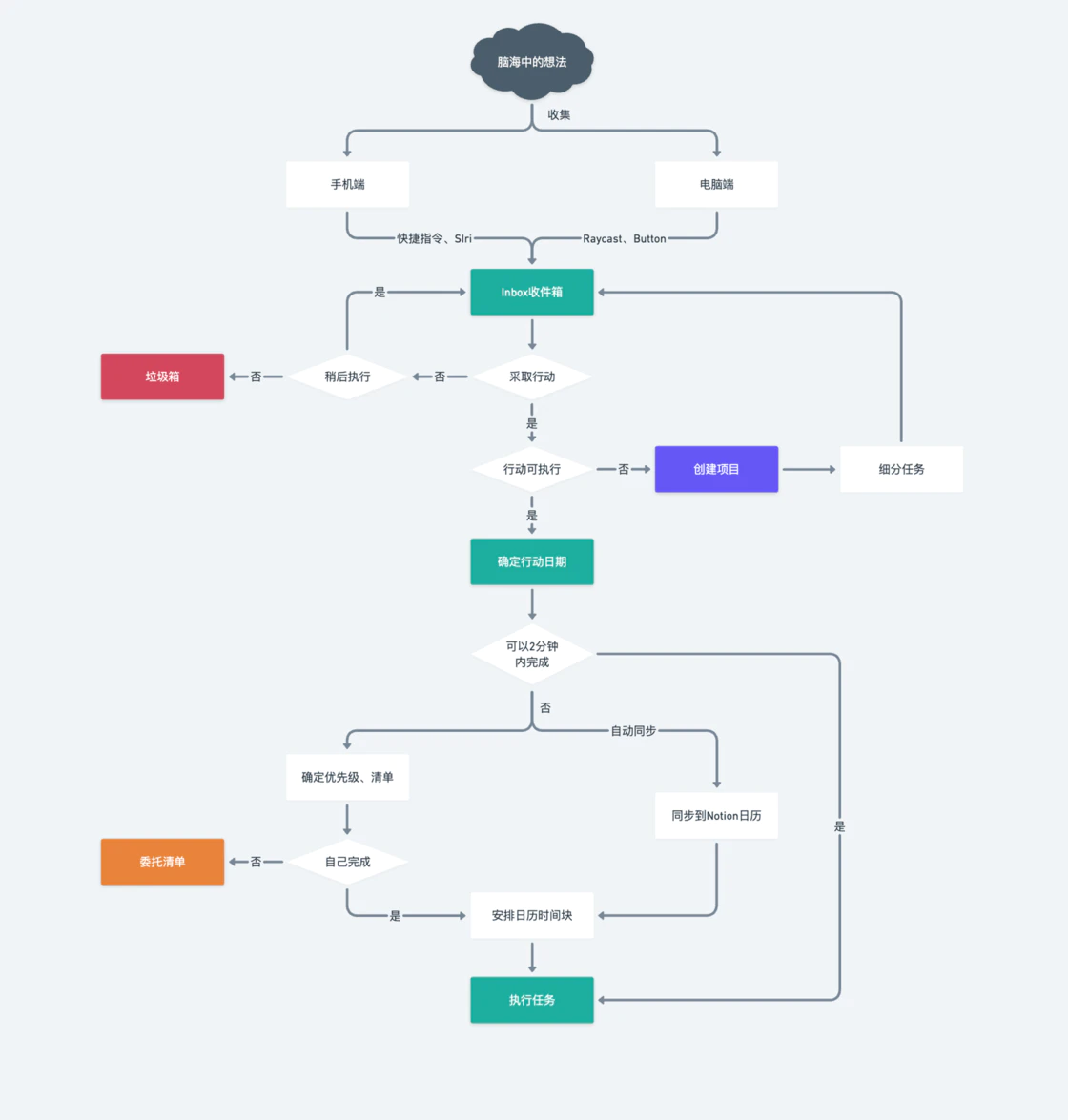
The brain forgets ideas fast. In daily life we often think of something we need to do, but if we don't act on it immediately, it's gone. So you should make capture as frictionless as possible. Two angles help: where to capture and how to capture, both aimed at lowering the cost of recording.
- Where to capture: Setting priorities and assigning lists takes time and energy, which adds friction. That's why you need an "Inbox" — a centralized, convenient, temporary collection point that lets you grab every idea and task on the fly so you can process them later.
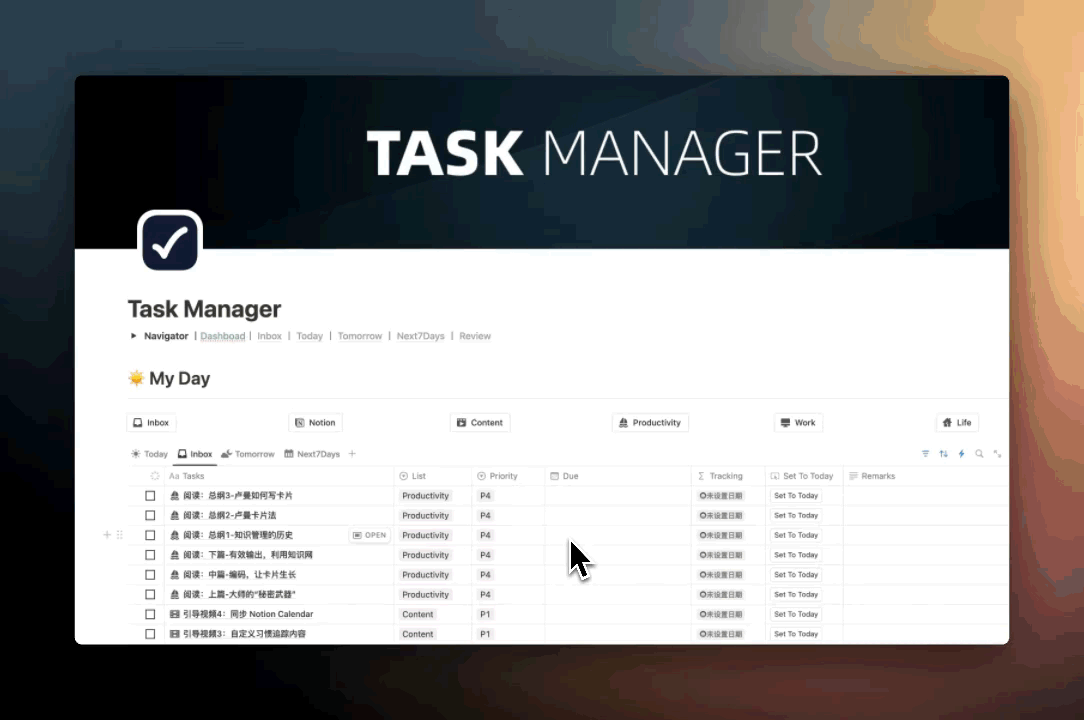
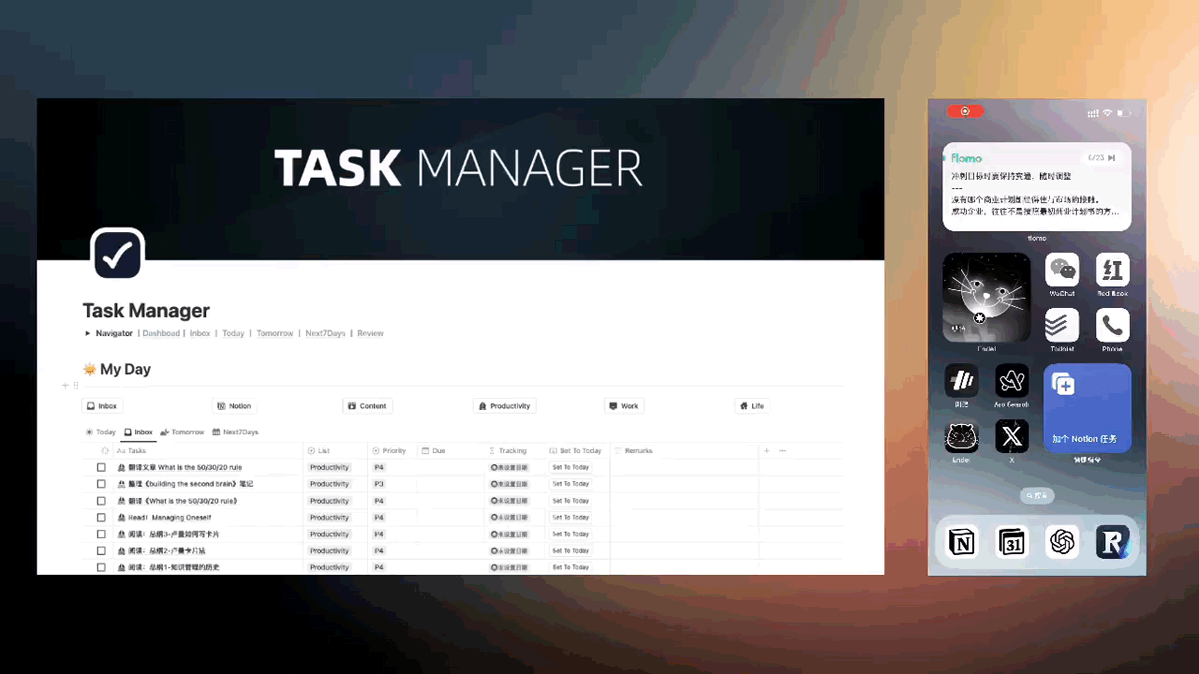
- How to capture: The moment an idea appears, log it as fast as possible. Since I use Notion for tasks, "open Notion → open the task panel → create new task" is way too slow. On Mac, Raycast lets me record tasks instantly. On mobile, I use Shortcuts to send task content straight into Notion — even via Siri voice input. This dramatically lowers the cost of capture.
In practice: Capturing on Mac
In practice: Capturing on iPhone with Shortcuts
② Clarify
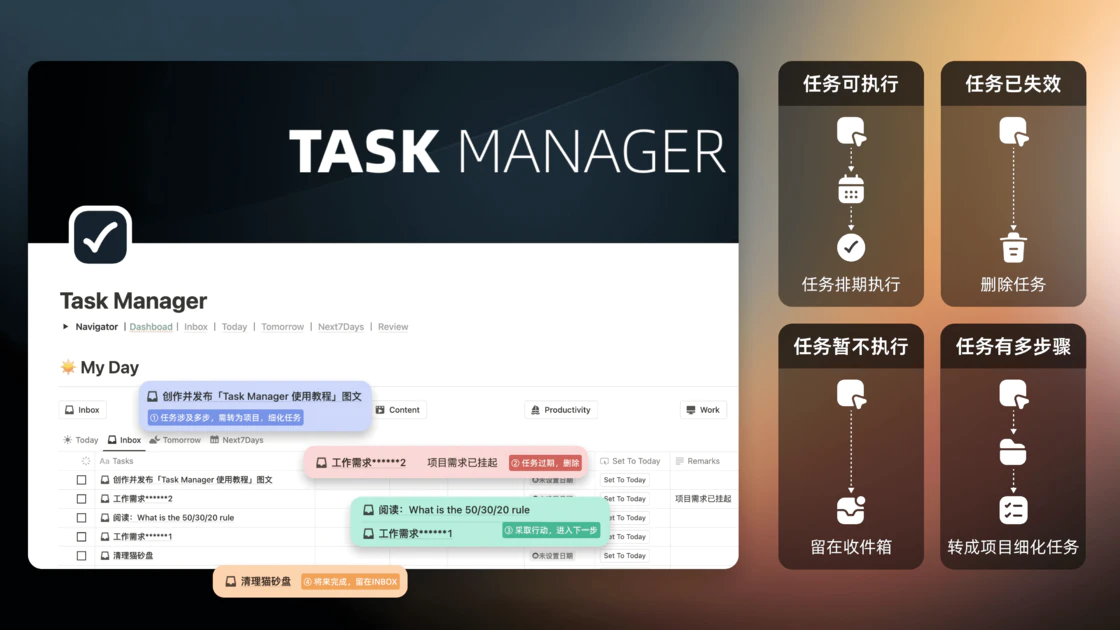
Once tasks are captured, classify and analyze them: which need immediate action, which can wait, and which can be dropped. If a task is vague, add a quick note to capture your thinking.
Every morning, before work begins, I scan the Inbox and quickly decide whether each item needs action and what that action is. Items that need execution move to step three, Organize. Items I can deal with later stay in the Inbox and wait for the next pass. Items that turn out not to be worth doing get deleted immediately, freeing up the Inbox.
If a task is too big to act on directly, it probably needs to become a "project" with subtasks. For example, "Make a video about GTD task management" actually contains many steps and can't be finished in one sitting. Convert it into a project, then break it into smaller Inbox items: "Research GTD references," "Write the GTD video script," "Shoot the footage," "Edit the GTD video," "Publish to platforms."
③ Organize
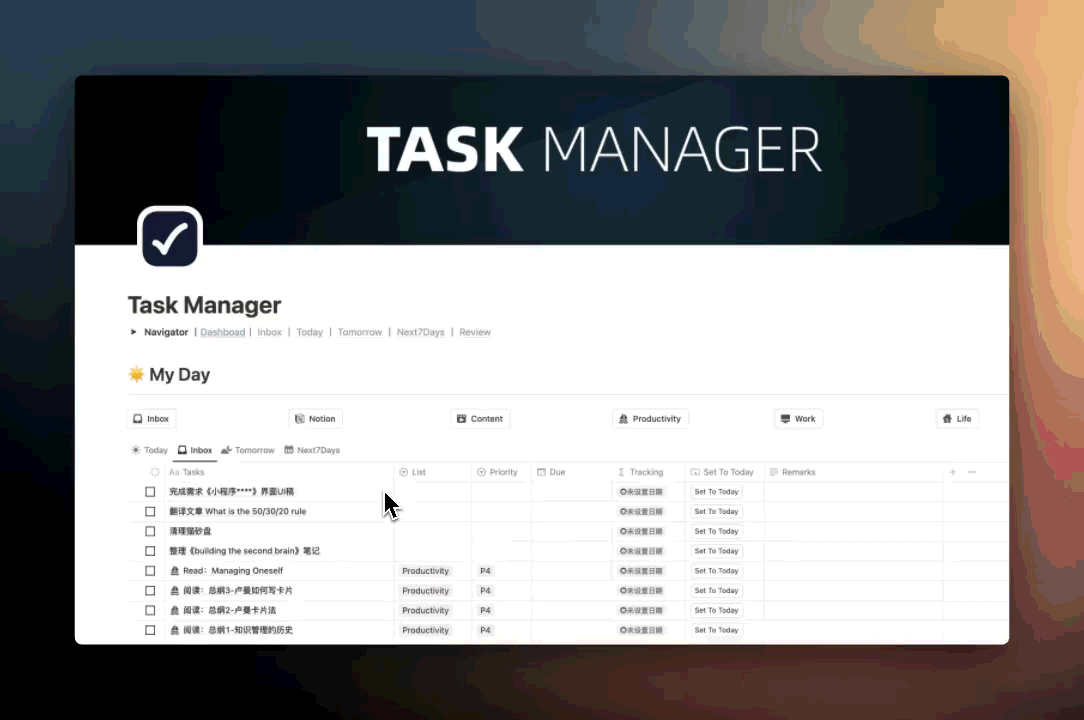
Step three takes the clarified tasks and arranges them by clear rules — assigning each one to the right project list and giving every task a defined place and priority.
- Set a date: Assign a due date. In Notion, a Database Button can shoot a task into today, or you can pick another date in the date picker. If you're worried about forgetting, add a Reminder. Because Notion and Notion Calendar are connected, the task also shows up on your calendar — perfect for time blocking (more on that in the next section).
- Project lists: Based on my own habits, I split projects into five lists — Notion tasks, content creation, work, learning, and life. Notion tasks sync to Notion Calendar, and with a different color per list, I can see at a glance how each category is distributed. This also makes reviews much easier.
- Priority: In my Notion I use five levels — "Polaris (most important), P1 (high), P2 (medium), P3 (low), P4 (none)." Priority is set against your long-term goals: tasks that move the goals forward go to P1/P2; loosely related or unrelated tasks go to P3/P4. Polaris is the daily north-star task — the hardest and most important task tied to a long-term goal — and there's usually only one per day.
- 2-minute tasks: Anything you can finish in two minutes should skip this whole Organize step and just get done immediately — paying a phone bill, replying to a message, etc.
Organize takes more time and energy than the other steps, but it's the key to keeping your task list and GTD system clear, ordered, and manageable.
In practice
In my own Notion x GTD setup, each project list has a preset template with a default priority. Notion tasks and content creation tasks default to P1/P2, work to P3, life to P4. When I'm in the Organize step, I just pick a template — the list, the icon, and the priority all come along for the ride, saving a ton of repetitive setup. You can always override the priority or any other property if needed.
④ Reflect
As mentioned, a backlog of tasks throws the GTD system into chaos. So you need to review your task list and progress on a regular basis.
- Cadence: Review daily, weekly, or monthly. I recommend at least one full review per week.
- Calendar review: Notion Calendar shows day, week, and month views. With a unique color per list, you can see at a glance how each task type is distributed across the day or the week. If my long-term goal is to grow my content, I can use the density of those color blocks to judge whether my recent tasks are pulling me toward that goal — and adjust quantity and time allocation accordingly.
- Clean up and reorganize: Delete outdated and no-longer-relevant tasks; mark completed tasks done; for tasks that keep stalling, re-clarify them and decide whether they should be promoted to projects with smaller subtasks.
- Reconfirm goals and adjust priorities: Goals shift over time, so during reflection re-confirm both your short-term and long-term goals. Then re-prioritize tasks against those goals and decide your next actions to keep moving in the right direction.
⑤ Engage
Engage is where you put your task list into practice — completing tasks step by step, on time, and updating their status when finished.
- Lead with the Polaris task: Tackle the most important and difficult task during your highest-energy, most uninterrupted hours. As Mark Twain put it, if you eat a live frog first thing in the morning, nothing worse will happen to you the rest of the day. So eat that frog first.
- Concentrate: Make sure you have enough time and energy before starting. Avoid bouncing between tasks, which fragments your focus and time.
- Knock out 2-minute tasks: Batch them and finish them first.
- Update task status: Check tasks off as soon as they're done, so nothing piles up.
- Handle the unexpected: Interruptions are inevitable. Stay flexible enough to adjust the plan, but don't let constant changes drain your motivation or derail the original schedule.
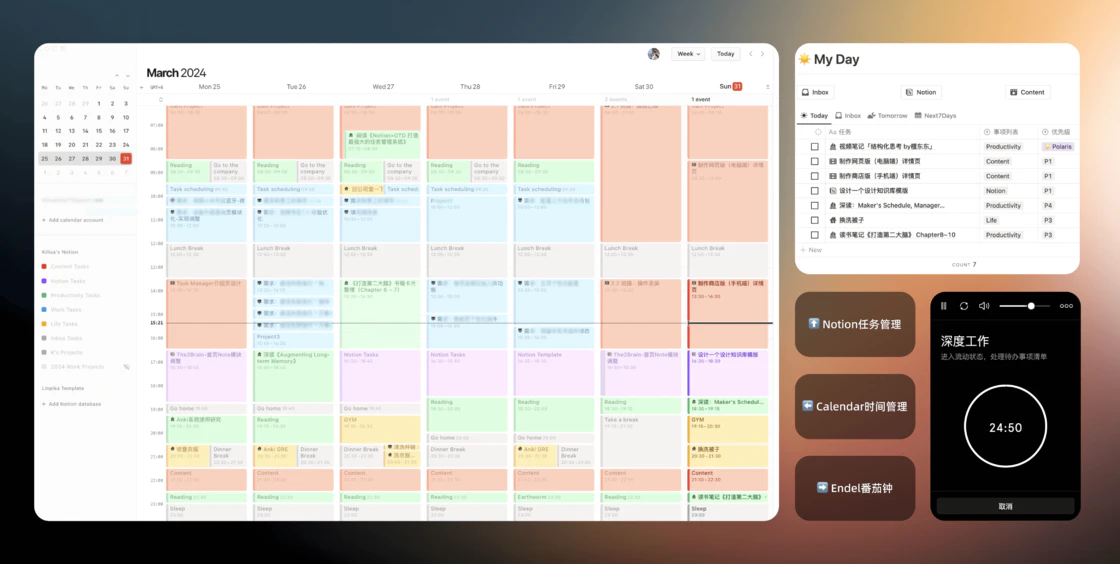
Time blocking is a time-management method that divides the day into specific blocks, each dedicated to a single task or activity, in order to boost efficiency and focus. I pre-allocate task blocks in Notion Calendar based on my schedule and assign them colors. This helps me concentrate on one task, reduce switching, and slip into deep work.
In practice:
Tasks sync from Notion to Notion Calendar, so I can quickly find the block each task belongs to. The Mac menu bar shows the current block's task, the next task, and tomorrow's blocks. Combined with the Endel Pomodoro timer, I drop into a focused state — just protect each pomodoro from interruptions and the work moves fast.
More Possibilities with Notion
What's fun about Notion is that it isn't limited to a single-purpose app. Features like TickTick's "Four Quadrants" and "Habit Tracker" are extremely useful, and I rebuilt both of them in Notion without much effort. Plus, with database Formulas, you can build all kinds of interesting stats and visualizations.
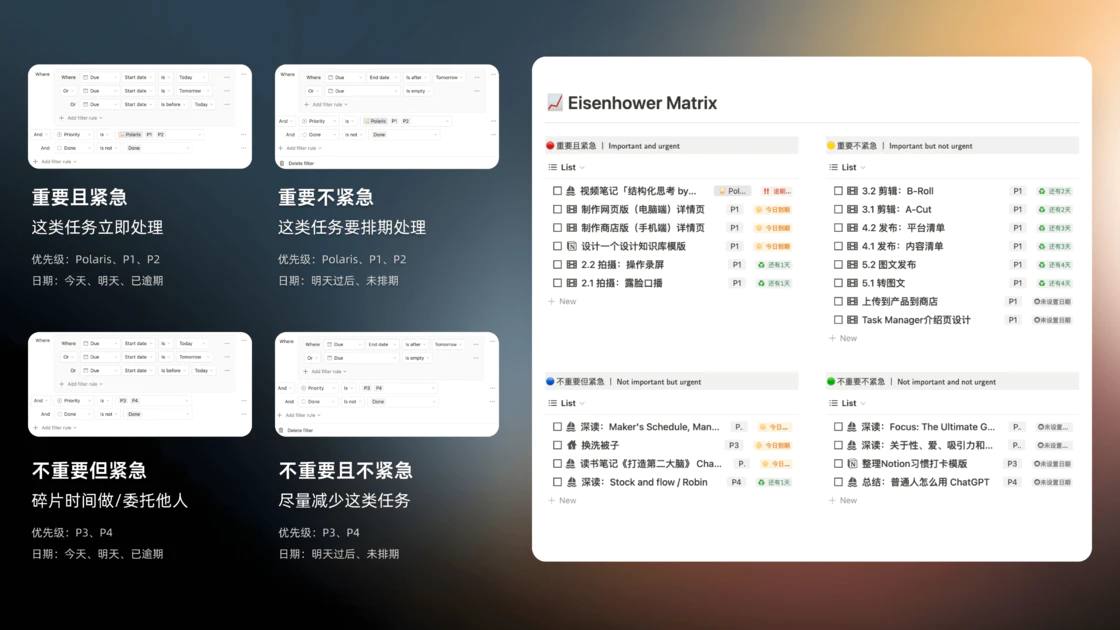
The Eisenhower Matrix
The Eisenhower Matrix — also known as the Eisenhower time-management method or the Four Quadrants — is a simple, practical time-management tool that helps people work more efficiently and stay focused on what matters. It comes from the 34th U.S. President, Dwight D. Eisenhower. In Notion, based on each task's due date and priority, tasks fall into four quadrants:
- Important and urgent: These tasks have major impact on your goals and values; deal with them now, no procrastination.
- Important but not urgent: No tight deadline, but still important — schedule time for them.
- Not important but urgent: Limited impact on long-term goals; handle them in low-energy fragments of time, or delegate.
- Not important and not urgent: They eat time without moving your goals forward — minimize these as much as possible.
Habit Tracking
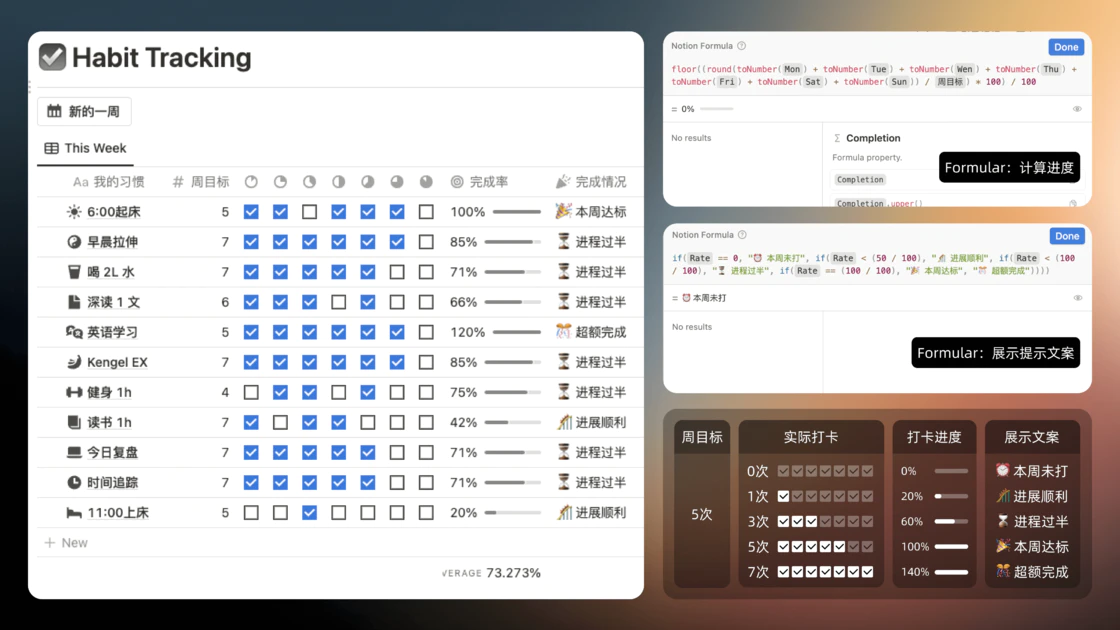
Habit tracking helps you record and monitor your behavior. In the long run, it has a real impact on personal growth.
- Tracking good habits: Builds awareness, strengthens self-management and follow-through, and helps you live a more disciplined life.
- Tracking bad habits: Helps you correct behavior and shift toward a healthier, more positive lifestyle.
In Notion you can build a Habit Tracker dashboard with a database. There's no cap on how many habits you can track, and the operation is dead simple — just check off each habit on the list every day. You can set a weekly target for each habit (say, going to the gym four times a week), and with a Formula you can calculate progress and visualize it as a progress bar. You can even surface a status label based on the gap between target and current count, such as "⏰ Not started this week," "🎢 On track," "⏳ Halfway there," or "🎊 Goal exceeded."
Wrap-up
GTD is an easy-to-implement, flexible time-management method. It's broadly applicable, can cover every part of your life, helps you focus on tasks, and offloads pressure from your brain. But it's also a system that needs sustained attention and upkeep.
Notion can shrink the overhead of running GTD to its lowest point. Put in the effort and time up front, and it eventually becomes second nature in daily life — giving you a stable, ordered existence. Well worth the investment.
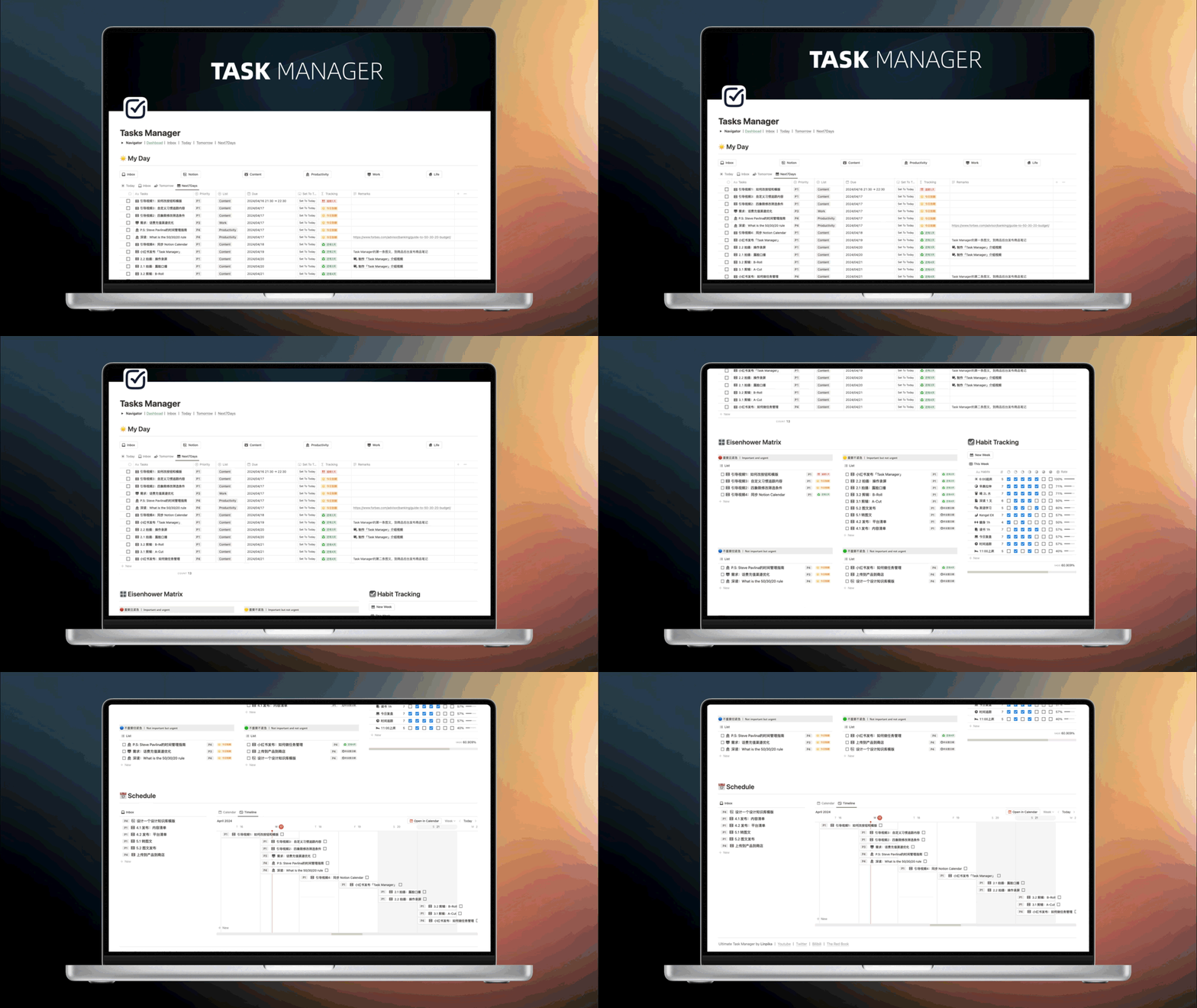
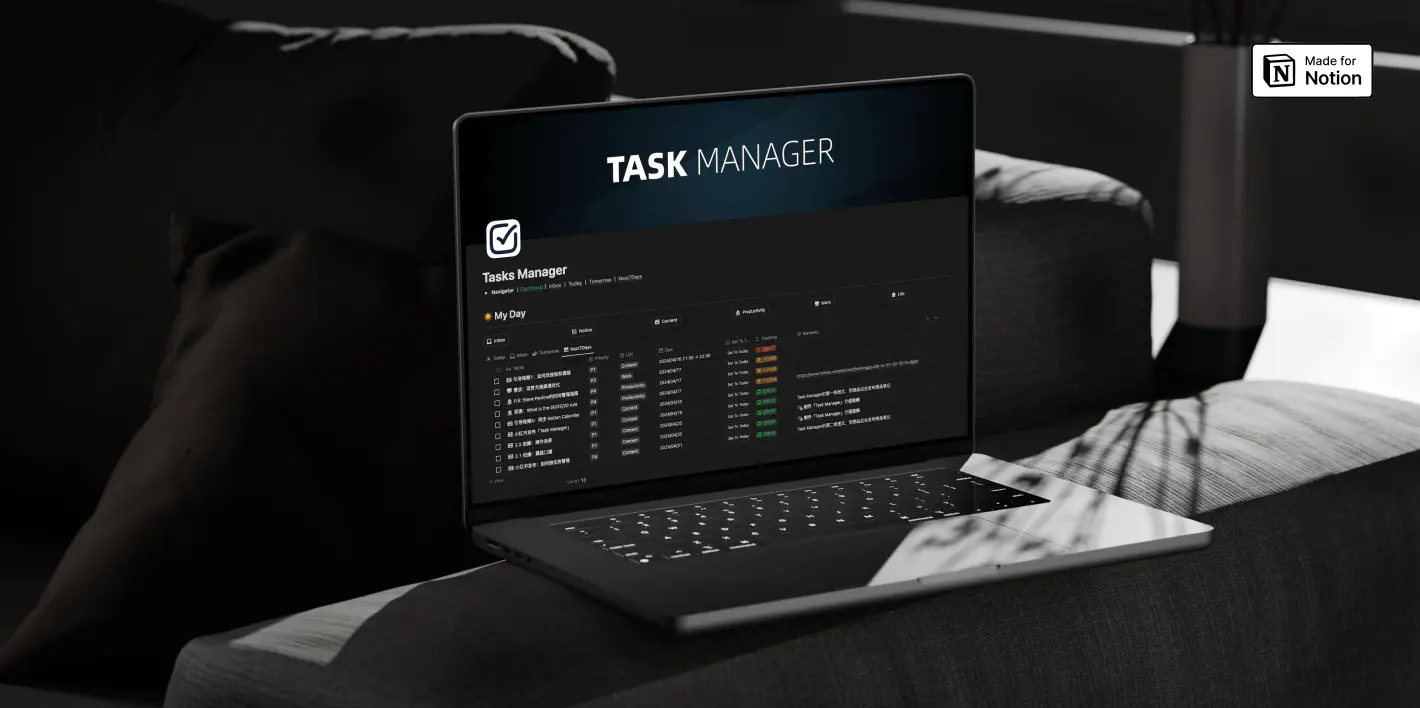
Finally, here's a peek at the "Task Manager" dashboard I built.